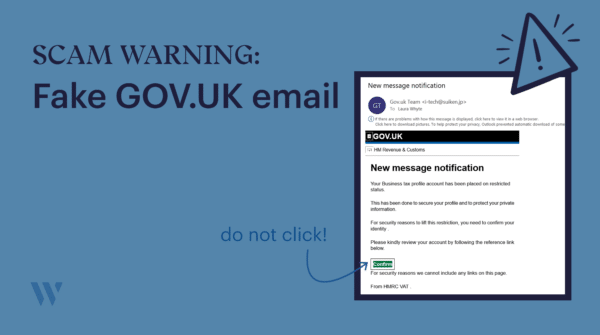
We have been made aware of a fraudulent email circulating that impersonates HM Revenue & Customs (HMRC)/GOV.UK. If you or your business receives this message, do not click any links or provide any personal information.
What does the email look like?
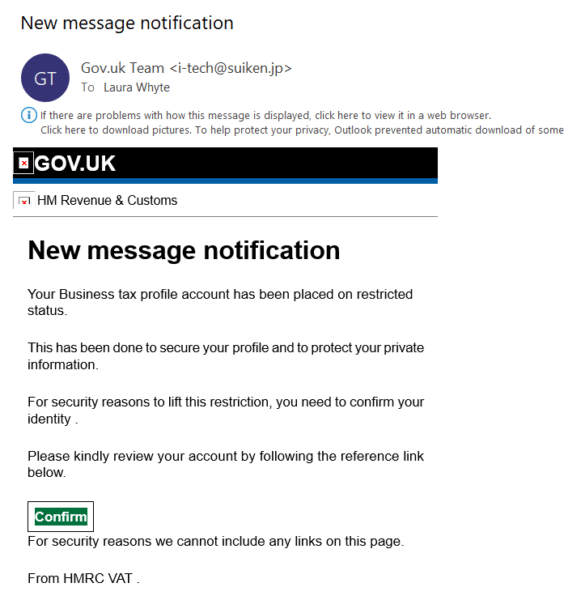
The email appears to come from the ‘Gov.uk team’ and uses official-looking HMRC branding, including the GOV.UK logo and an HM Revenue & Customs header. However, if you check the sender’s address you can tell it’s fraudulent and is from a domain with no connection to the UK government.
The email contains a ‘Confirm’ button and claims that for security reasons it cannot display links directly on the page. This is a tactic used to disguise where the button actually leads. Clicking it is likely to direct you to a spoofed website designed to steal your login credentials or personal details.
Here’s a screenshot:
How to stay safe
Warning signs and what to do
- The sender address is not a gov.uk address. Always check this carefully.
- HMRC will never email you asking you to confirm your identity via a link.
- Do not click ‘confirm’ or any button in the email.
- Do not enter any login details, passwords, or personal information.
- Report the email to HMRC’s phishing team at [email protected], then delete it.
- If you have already clicked the link, contact your bank and change your passwords immediately.
If you are unsure whether any communication from HMRC is genuine, please do not hesitate to contact us. We can help you verify correspondence and advise on next steps.
You can also report suspicious emails and find further guidance on the GOV.UK website at gov.uk/report-suspicious-emails-websites-phishing.
Stay safe!